

Telegram
Receive alerts via a Telegram bot.
To receive notifications on Telegram, you need to create a bot and obtain its access token as well as the recipient chat ID.
Configuration of Telegram Bot
Contact @BotFather on Telegram to create a new bot and get your Token (e.g.,
123456:ABC-DEF1234...).
Start a conversation with your bot (click "Start").
Retrieve your Chat ID (you can use a bot like @userinfobot to find it).
Warning
You need to grant the bot the proper permissions (administrator or at least the right to manage topics). Otherwise, an error will occur.
Configuration on the dashboard
Go to Notifications > Channels, click on + Add Notification Channel, and choose Telegram.
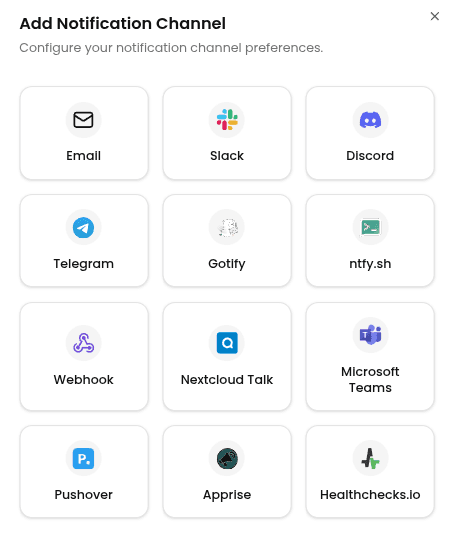
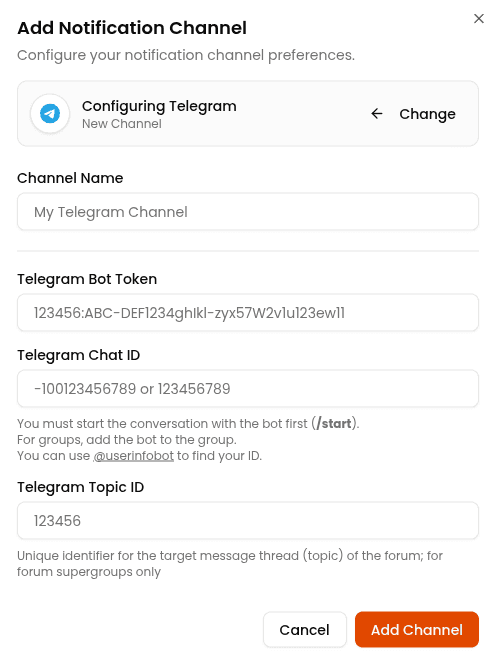
Enter the following information:
- Bot Token: The token provided by BotFather.
- Chat ID: The numeric identifier of the conversation or group.
- Topic ID : The numeric identifier of the topic you want to monitor (optional, to filter notifications).
To test the configuration, click the channel's edit icon, then click Test Channel. Your bot should send you a test message immediately.
Last updated on