

Apprise
Send notifications to 100+ services through your own Apprise API server.
Apprise is a notification gateway that relays a single message to 100+ services (Discord, Telegram, Slack, email, ntfy, Gotify, and many more). Portabase talks to a self-hosted Apprise API server using a persistent configuration.
Configuration on your Apprise API server
Run an Apprise API instance (for example the caronc/apprise Docker image) and note its base URL (e.g., http://localhost:8000).
Register a persistent configuration under a key of your choice. Portabase sends to POST /notify/{key}, so this key must exist on the server. Add the target service URLs (Discord, Telegram, etc.) to that configuration.
Copy the config key you chose (e.g., my-alerts).
Portabase does not store the destination service URLs. They live in the persistent configuration on your Apprise server; Portabase only references it by its config key.
Configuration on the dashboard
Go to Notifications > Channels, click on + Add Notification Channel, and choose Apprise.
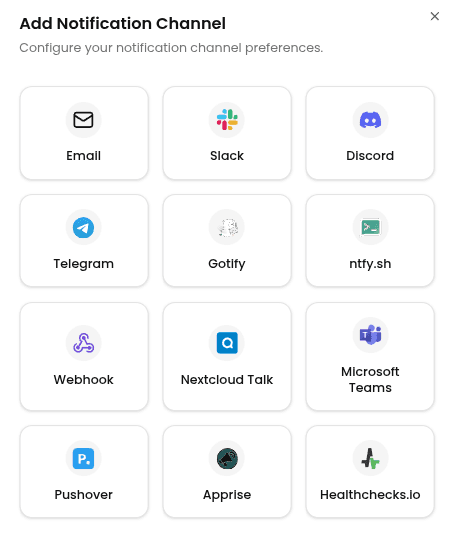
Enter the following information:
- Channel Name: A label for this channel in Portabase.
- Apprise Server URL: The base URL of your Apprise API server (e.g.,
http://localhost:8000). - Config Key: The persistent config key registered on your server (e.g.,
my-alerts). - Custom Headers (Optional): Add headers if your server sits behind a reverse proxy or basic auth (e.g.,
Authorization).
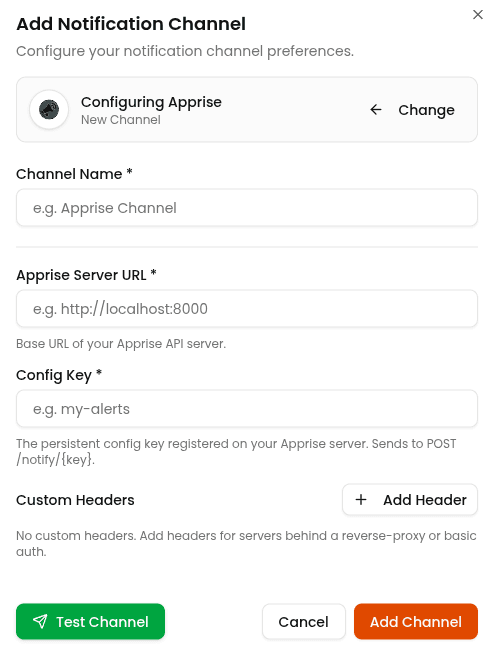
To test the configuration, click the channel's edit icon, then click Test Channel. The message should be relayed to every service in your Apprise configuration.
Last updated on