

Portabase DashboardUsage (How-to)Notification
Pushover
Send push notifications to your devices via Pushover.
Pushover is a service for sending real-time push notifications to your phone, tablet, or desktop.
Creation of an application on Pushover
Log in to your Pushover account.
Go to Create an Application/API Token and register a new application (e.g., "Portabase").
Copy the generated API Token/Key.
On your Pushover dashboard, copy your User Key (top right of the page).
Configuration on the dashboard
Go to Notifications > Channels, click on + Add Notification Channel, and choose Pushover.
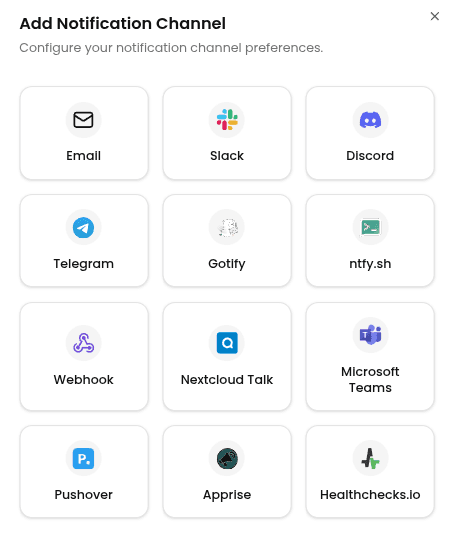
Enter the following information:
- Channel Name: A label for this channel in Portabase.
- User Key: Your personal User Key, or your Group Key to notify a team.
- App API Token: The application token created above.
- Message Priority (Optional): Emergency priority repeats every 60 seconds until acknowledged, for at most one hour.
- Device Name (Optional): Target one registered device. Leave it empty to send to all of them.
Then click Add Channel.
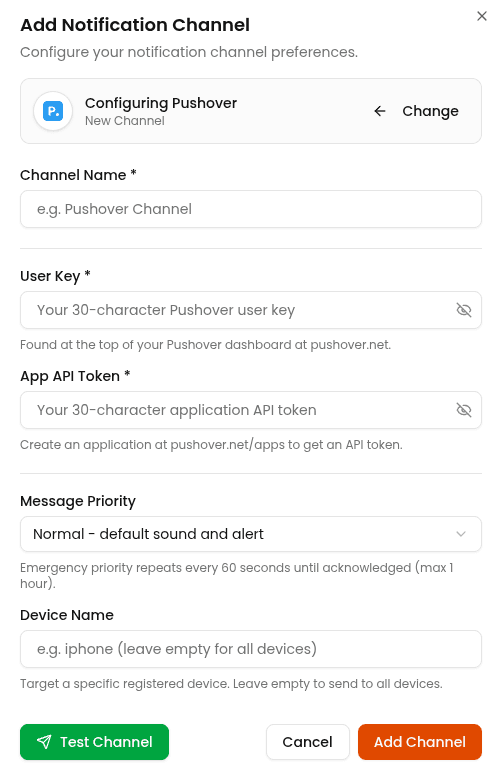
To test the configuration, click the channel's edit icon, then click Test Channel. The message should appear instantly on your device(s).
Last updated on