

Object Storage (S3)
Configure external storage for your backups (MinIO, AWS, Scaleway...).
By default, Portabase stores backups on the local disk of the server. For production environments, we strongly recommend using external storage to:
- Decouple storage from compute resources.
- Benefit from virtually unlimited capacity.
- Ensure data protection through the reliability of dedicated storage solutions.
Provider configuration (if self-hosted)
This adds a MinIO service to your Docker Compose stack, typically behind Traefik.
Docker Compose changes
MinIO exposes two ports:
- 9000: S3 API (used by Portabase).
- 9001: Web Console (admin UI).
name: portabase-stack

services:
  portabase:
    image: portabase/portabase:latest
    container_name: portabase-app
    env_file: .env
    volumes:
      - portabase-data:/data
    depends_on:
      db:
        condition: service_healthy
    networks:
      - traefik_network
      - default
    labels:
      - "traefik.enable=true"
      - "traefik.http.routers.portabase.rule=Host(`dashboard.example.com`)"
      - "traefik.http.routers.portabase.entrypoints=websecure"
      - "traefik.http.routers.portabase.tls.certresolver=myresolver"

  # ... standard DB service ...

  s3:
    image: docker.io/bitnami/minio:latest
    container_name: portabase-minio
    expose:
      - 9000
      - 9001
    volumes:
      - minio-data:/data
    environment:
      - MINIO_ROOT_USER=${S3_ACCESS_KEY}
      - MINIO_ROOT_PASSWORD=${S3_SECRET_KEY}
      - MINIO_DEFAULT_BUCKETS=${S3_BUCKET_NAME}
    networks:
      - traefik_network
      - default
    labels:
      - "traefik.enable=true"
      - "traefik.http.routers.api-s3.rule=Host(`api.s3.example.com`)"
      - "traefik.http.routers.api-s3.entrypoints=websecure"
      - "traefik.http.routers.api-s3.tls.certresolver=myresolver"
      - "traefik.http.services.api-s3.loadbalancer.server.port=9000"
      - "traefik.http.routers.webui-s3.rule=Host(`console.s3.example.com`)"
      - "traefik.http.routers.webui-s3.entrypoints=websecure"
      - "traefik.http.services.webui-s3.loadbalancer.server.port=9001"

volumes:
  portabase-data:
  postgres-data:
  minio-data:

networks:
  traefik_network:
    external: true
You can run a single-node RustFS instance using Docker Compose.
1. Docker Compose configuration
name: portabase-stack

services:
# ... other services (portabase, db) ...

  rustfs:
    image: rustfs/rustfs:latest
    container_name: portabase-rustfs
    expose:
      - 9000
      - 9001
    environment:
      - RUSTFS_ADDRESS=0.0.0.0:9000
      - RUSTFS_CONSOLE_ADDRESS=0.0.0.0:9001
      - RUSTFS_CONSOLE_ENABLE=true
      - RUSTFS_ACCESS_KEY=${S3_ACCESS_KEY}
      - RUSTFS_SECRET_KEY=${S3_SECRET_KEY}
    volumes:
      - rustfs-data:/data
    networks:
      - traefik_network
      - default
    labels:
      - "traefik.enable=true"
      # Route 1: S3 API
      - "traefik.http.routers.rustfs-api.rule=Host(`s3.example.com`)"
      - "traefik.http.routers.rustfs-api.entrypoints=websecure"
      - "traefik.http.routers.rustfs-api.tls.certresolver=myresolver"
      - "traefik.http.services.rustfs-api.loadbalancer.server.port=9000"
      # Route 2: Web Console
      - "traefik.http.routers.rustfs-console.rule=Host(`console.s3.example.com`)"
      - "traefik.http.routers.rustfs-console.entrypoints=websecure"
      - "traefik.http.routers.rustfs-console.tls.certresolver=myresolver"
      - "traefik.http.services.rustfs-console.loadbalancer.server.port=9001"

volumes:
  rustfs-data:

networks:
  traefik_network:
  external: true
Configuration on the dashboard
In Storage > Channels, click on + Add Storage Channel choose S3.
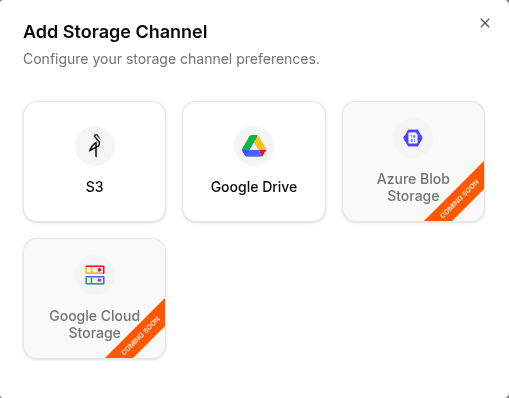
Enter the credentials.
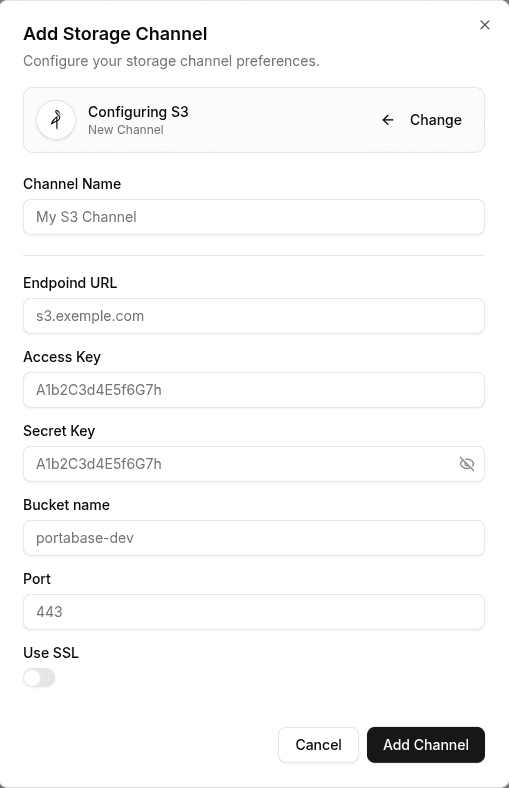
Click Add Channel to finalize the configuration.
Verification
- Restart the dashboard:
portabase restart .docker-compose down && docker-compose up -d- Log into the web UI.
- Trigger a manual backup on an agent.
- Check your bucket (or MinIO console) to confirm the backup file exists.
Last updated on